Apple Pay and Google Pay Recurring Payment Failures: Causes, Tokens and Recovery
Wallet checkouts convert beautifully. A customer taps Apple Pay or Google Pay, confirms with a face scan, and your subscription starts in seconds. Then a few months later a cluster of those subscribers fails to renew, often right after a new iPhone launch or a wave of card reissues, and the decline codes look like ordinary card failures.
They are not ordinary. A wallet payment is a tokenized card, and the token you saved at checkout may be tied to a single device. When the device changes or the card is removed from it, the token can stop working for future charges you initiate. This guide explains how wallet tokens behave on renewals, which failures are wallet-specific, and how to prevent and recover them.
TLDR:
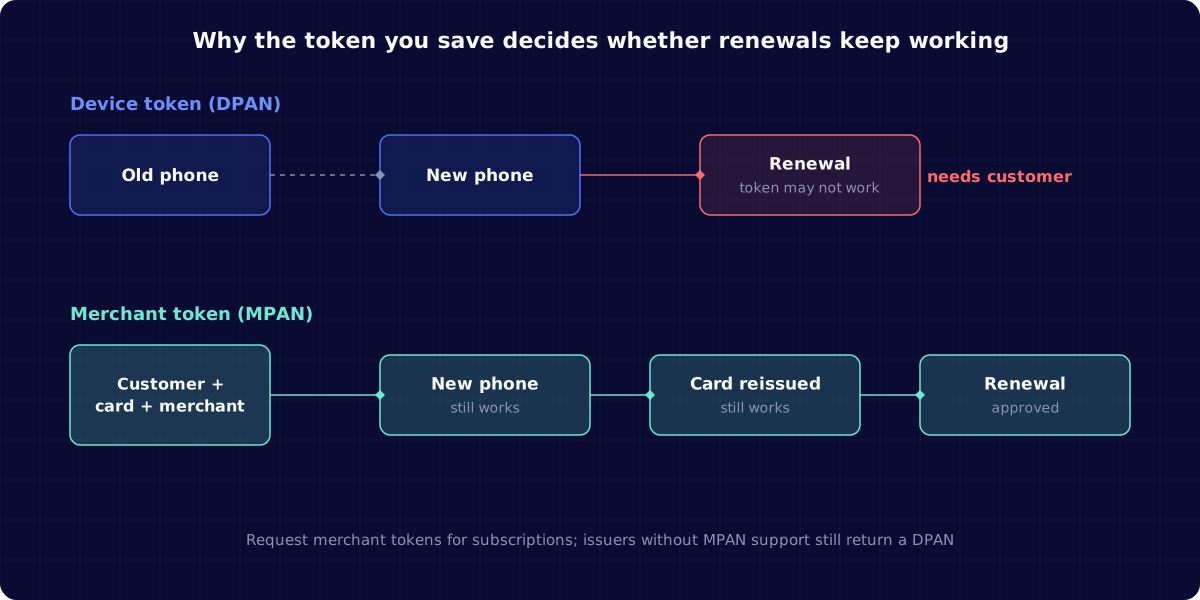
- Apple Pay creates a Device Primary Account Number (DPAN) by default, tied to one device; if the customer replaces the device or removes the card, the DPAN might stop working for merchant-initiated renewals.
- Apple Pay merchant tokens (MPANs) are tied to the customer, card and merchant instead, and keep working after a card is reissued.
- Google Pay returns either a device token with a 3D Secure cryptogram or a card number without one, and the two behave differently on renewals.
- Most wallet renewal failures still carry normal card decline codes, so you have to look at the payment method's token type to spot the pattern.
- Slicker handles tokenized wallet payments with strategies adapted to the wallet and the underlying card, and sends a one-click update link when the customer needs to re-add their wallet.
How Apple Pay and Google Pay Work for Subscriptions
When a customer adds a card to a wallet, the wallet does not hand merchants the real card number. It creates a network token that stands in for the card. Mollie's explanation of wallet card numbers puts it simply: the real card number is never shared with the merchant.
For a one-time purchase that is all you need. For a subscription you save the wallet payment method and charge it later without the customer present, which is a merchant-initiated transaction. Whether that later charge succeeds depends on what kind of token you saved and whether it is still valid.
Wallet payments carry the last four digits and expiry of the underlying card, so they look like any other card in your billing system. That is convenient, and it is also why wallet-specific failures are easy to miss.
Device Tokens vs Merchant Tokens
Stripe's documentation on Apple Pay merchant tokens explains the core difference. By default, Apple Pay creates a DPAN tied to a specific device. If the customer replaces the device or removes the card from it, the DPAN might no longer work. That does not affect one-time customer-initiated payments, but it can cause failures on future merchant-initiated ones.
An MPAN is associated with the customer, the underlying card and your business, not with one device. Apple's merchant token overview says MPANs support recurring models so payments continue even after a card is reissued, and that deleting a DPAN from a device does not affect an MPAN that already exists.
| Token | Tied to | Survives new device | Survives card reissue | Best for |
|---|---|---|---|---|
| Apple Pay DPAN | One device | Not reliably | Depends on network updates | One-time purchases |
| Apple Pay MPAN | Customer, card and merchant | Yes | Yes, per Apple | Subscriptions, reloads, deferred payments |
| Google Pay device token (CRYPTOGRAM_3DS) | The device's tokenized card | Not reliably | Depends on network updates | Android in-app and web checkout |
| Google Pay card on file (PAN_ONLY) | Card saved to the Google account | Yes | No, behaves like a stored card | Fallback where device tokens are not available |
Why Apple Pay Recurring Payments Get Declined
Most Apple Pay renewal failures trace to one of five causes.
- The device token stopped working. The customer upgraded their phone, wiped it, or removed the card from Wallet. A saved DPAN may no longer authorize.
- The underlying card was replaced. A reissued or replaced card needs the token to be updated. MPANs are designed to carry that update; DPANs depend on the network and wallet updating the device token.
- The customer revoked the payment. Customers can manage preauthorized payments in Wallet. When they revoke an MPAN-based payment, Apple triggers a callback so the merchant can start recovery.
- An ordinary card decline. Insufficient funds, a do-not-honor response or a fraud block apply to wallet cards exactly as they do to plastic cards.
- The issuer does not support merchant tokens. If the issuer has not implemented MPANs, Apple returns a DPAN instead, so you may hold device tokens even after you start requesting merchant tokens.
Why Google Pay Recurring Payments Fail
Google Pay works a little differently. The Google Pay payment data documentation describes two authentication methods. With CRYPTOGRAM_3DS, the card is a device token authenticated with a 3D Secure cryptogram. With PAN_ONLY, Google returns the card number saved to the customer's Google account, without a cryptogram.
That split matters for renewals. Device tokens behave like Apple's DPANs: a new phone or a removed card can break future charges. Card-on-file credentials behave like any stored card: they survive device changes but fail when the card expires or is replaced, unless your processor's card updater catches it. In the EEA and UK, a card-on-file credential used for the first payment may also need 3D Secure, which affects whether later renewals qualify as merchant-initiated.
Wallet Decline Codes and How to Read Them
Wallet renewals rarely come back with a code that says "wallet." You see the same decline codes as cards, so you need to read them alongside the payment method's token type.
| What you see | Likely wallet cause | Recovery |
|---|---|---|
expired_card or invalid account on a wallet card | Device token no longer valid, or card replaced | Ask the customer to pay again with their wallet or another method |
do_not_honor or generic decline | Usually a normal issuer decline | Retry with smart timing |
insufficient_funds | Normal funds problem | Retry around pay cycles |
| A revocation callback from Apple | Customer turned off the preauthorized payment | Treat like a cancelled agreement: message, do not retry |
| Repeated failures concentrated on DPANs | Device churn among your subscribers | Migrate saved wallets to merchant tokens at the next checkout |
If your payment provider exposes token type, split wallet failures by DPAN and MPAN. Stripe, for example, documents a card_token_type field for Sigma users so you can compare MPAN authorization rates.
Preventing Wallet Renewal Failures With Merchant Tokens
The single biggest fix for Apple Pay subscriptions is to request merchant tokens. Stripe's documentation shows how to pass a recurringPaymentRequest with a description, a management URL and the billing interval when the customer pays. Stripe Checkout requests merchant tokens automatically when needed.
Three details are easy to miss:
- Supply a real management URL. It should point to a page where the customer can see and manage the subscription. Apple surfaces recurring payment details in the payment sheet and in Wallet.
- Handle the fallback. If the issuer does not support MPANs, you still get a DPAN. Your recovery flow needs to handle both.
- Listen for lifecycle events. When the card behind an MPAN changes, Stripe sends a
payment_method.automatically_updatedwebhook. Update the cached expiry and last four digits so your own emails and dashboards stay accurate.
Apple also lets merchants send upcoming and past payment details to Wallet, which Apple says helps reduce declines from insufficient funds.
Recovering Wallet Renewal Failures
When a wallet renewal fails, first decide whether time can fix it.
- Normal card declines: retry, with timing based on the decline reason, card type and issuer, exactly as you would for a card. The soft decline retry playbook covers timing.
- Token or device failures: retries will not help. Ask the customer to pay again with their wallet on your site or app. A fresh wallet checkout creates a new token, ideally an MPAN.
- Revoked payments: treat these like a cancelled agreement. The customer chose to stop the payment, so message clearly and make it easy to restart.
The message for a token failure should be specific. "Your Apple Pay payment for [Brand] needs to be set up again on your new device" works far better than "your card was declined," which sends customers to check a card that is fine. Link straight to a page that opens the wallet sheet, so the fix is one tap and a face scan.
Wallet Payments and Card Updaters
Card updaters and network token services refresh stored card details when a card is reissued. For wallet payments, the picture depends on the token. MPAN updates arrive through the wallet's lifecycle management. Card-on-file credentials from Google Pay can benefit from your processor's updater like any stored card. Device tokens depend on the network and the wallet updating the token on the device.
If your recovery tool treats every failure on a wallet card as an expired card, it will send the wrong message. The post on card account updaters vs smart retries explains how updaters and retries should work together.
Migrating Existing Wallet Subscribers to Merchant Tokens
Requesting merchant tokens fixes new signups, but your existing Apple Pay subscribers still sit on device tokens. You do not need to force everyone through checkout again. Pick moments when the customer is already on-session:
- Plan changes and upgrades. When a customer changes plan, collect payment with a fresh wallet sheet that requests a merchant token.
- After a wallet failure. The recovery checkout is the natural point to replace a broken DPAN with an MPAN.
- Annual renewals. For high-value annual plans, a short pre-renewal email inviting customers to confirm their payment method can move them onto merchant tokens before the charge.
Track the share of active wallet subscriptions on merchant tokens month by month. It should rise steadily as old device tokens are replaced.
What to Track for Apple Pay and Google Pay Subscriptions
Wallet payments deserve their own lines in your payment reporting.
- Wallet share of new subscriptions vs share of renewal failures. If wallets are 30% of signups but 45% of failures, token churn is likely.
- Renewal authorization rate by token type. DPAN vs MPAN for Apple Pay; device token vs card on file for Google Pay.
- Failure spikes after device launches. New phone releases and holiday gifting periods are when device tokens churn.
- Re-checkout rate after a wallet failure email. Whether customers complete the one-tap fix.
- Revocations per month. A rise can signal confusing billing descriptors or unclear subscription terms.
For a broader view of acceptance across methods and markets, Slicker's analytics features harmonize these metrics across payment providers.
How Slicker Handles Apple Pay and Google Pay Recurring Failures
Slicker treats digital wallet payments as tokenized payment methods rather than plain cards. It reads the decline code alongside the wallet and underlying card, applies smart retries only where a retry can succeed, and stops early on token and device failures that need the customer.
When the customer has to act, Slicker sends a hyper-personalized email from your domain that names the wallet, explains what changed, and links to a one-click page to pay again. Results are measured with AABB testing, so you can see the incremental revenue recovered from wallet subscribers. The digital wallets solution page has more detail.
Final Thoughts on Apple Pay and Google Pay Recurring Payment Failures
Wallets make signup easy and renewals fragile if you save the wrong kind of token. The good news is that the biggest fix is a configuration change: request merchant tokens for Apple Pay subscriptions, and handle both device tokens and card-on-file credentials for Google Pay.
Then make sure your recovery flow can tell a wallet token failure from an ordinary decline, retry only the second, and ask customers to re-add their wallet for the first. If you want to see how wallet failures show up in your data, talk to the Slicker team.
FAQ
Why does my Apple Pay subscription payment keep getting declined?
The most common wallet-specific reason is that the saved token was a device token (DPAN) and the customer changed phones or removed the card from Wallet. Ordinary card declines such as insufficient funds also apply. Check the decline code and whether the payment method is a DPAN or a merchant token.
What is an Apple Pay merchant token?
A merchant token, or MPAN, is an Apple Pay token tied to the customer, their card and your business rather than to one device. Apple designed it for subscriptions, automatic reloads and deferred payments, so renewals keep working when the customer gets a new device or their card is reissued.
Should I retry a failed Apple Pay or Google Pay renewal?
Retry only when the decline is the kind time can fix, such as insufficient funds or a temporary issuer decline. If the token itself no longer works, retries will fail; ask the customer to pay again with their wallet so a new token is created.
Do Google Pay recurring payments work differently from Apple Pay?
Yes. Google Pay can return a device token with a 3D Secure cryptogram or the card number saved to the customer's Google account. Device tokens can break when the device changes, while card-on-file credentials behave like stored cards and fail mainly on expiry or replacement.
How can I reduce involuntary churn from wallet subscribers?
Request Apple Pay merchant tokens for subscriptions, track renewal authorization rates by token type, send wallet-specific messages when a token fails, and link customers to a one-tap wallet checkout. Measure the effect with a controlled test so you know which changes recover revenue.
Related Articles
PayPal Subscription Payment Failed: Why It Happens and How to Recover It
A subscriber pays you through PayPal every month without thinking about it. Then their linked bank card expires, or they tidy up their PayPal settings and...
Authentication Required Declines on Subscription Renewals: SCA, MIT Exemptions and Recovery
A renewal that has charged cleanly for a year suddenly comes back declined with authentication_required. The card is valid, the customer has money, and nobody...
Stripe Smart Retries Alternatives for Subscription Businesses (October 2026)
You turned on Stripe Smart Retries because it was free, it was one toggle, and Stripe said it beats a fixed schedule. Months later your past-due list still...
Stop losing revenue to failed payments
Join leading subscription businesses using Slicker to recover failed payments automatically.
Get Started