Retry Old Card or Wait for CAU? A Oct 2026 Guide

Card account updater retry logic sounds straightforward until you're staring at a mixed queue of expired cards, insufficient funds declines, and closed accounts. Each one has a different right answer, and the cost of confusing them goes beyond a failed charge: a burned retry attempt, a network compliance flag, or a dunning email sent to someone whose card quietly refreshed on its own.
TLDR:
- A card account updater (CAU) refreshes stale stored credentials; 33 to 40% of cards are reissued each year.
- Match your retry path to the decline type: credential problem, run CAU first; insufficient funds, skip CAU and optimize retry timing.
- Each CAU response (new card, closed account, opt-out, no change) maps to a distinct action; conflating them burns retry allowance or triggers MAC penalties.
- A CAU refresh does not reset your network retry clock: Visa caps 15 attempts per 30 days, Mastercard 10 per 24 hours.
- Slicker's AI models score a CAU-refreshed card across more than 40 variables (validated through AABB testing on each customer's own transaction data) to schedule the retry at the moment most likely to authorize.
What Is a Card Account Updater (and What Problem Does It Solve)?
Stored card credentials go stale constantly. Cards expire, get reissued after fraud or theft, or change through bank portfolio conversions, and any one of those events can turn your next scheduled charge into a decline.
A card account updater (CAU) closes that gap by refreshing stored payment credentials before or after a charge attempt. Nearly every second shopper completes purchases using stored credentials, but those details don't stay current on their own. The CAU service queries card networks for updated card numbers and expiration dates, then replaces the stale data in your billing system, reducing avoidable declines on cards that are still active but recently reissued.
How Card Account Updater Works: The Step-by-Step Process
Four parties drive the workflow: your billing system, your acquirer, the card network, and the issuing bank.
When a card on file is flagged for an update check, your acquirer submits stored credentials to either Visa Account Updater (VAU) or Mastercard Automatic Billing Updater (ABU). The network queries the issuing bank, retrieves any account changes, and returns refreshed data back through the acquirer to your vault. Your billing system then replaces the stale credentials before the next charge fires.

Both programs cover new card numbers, updated expiration dates, closed accounts, and cardholder opt-outs. Your retry logic acts on whatever structured response comes back.
Batch vs. Real-Time Updates: Key Differences and When Each Fits
Card updaters run in one of two modes, and the difference affects how stale your credentials are at charge time.
Batch | Real-Time | |
|---|---|---|
When it runs | Nightly or weekly file submission | At the moment of charge attempt |
Latency | Hours to days | Seconds |
Coverage | Broad, proactive | Reactive, per-transaction |
Complexity | Lower | Higher |
Batch is the more common implementation. Your acquirer submits a file of stored credentials on a schedule, retrieves updates, and refreshes your vault before the next billing run. For a deeper look at real-time card updates vs. batch account updaters, the tradeoffs extend beyond latency. Real-time queries the network mid-transaction, so the card is checked the instant a charge fires.
With roughly 33 to 40% of cards reissued in any given year, a weekly batch cycle can leave a meaningful window where stale credentials sit in your vault. Real-time closes that gap but adds integration complexity. For most subscription businesses running monthly billing, batch is sufficient; daily or intraday billing cycles benefit more from real-time coverage.
What a Card Updater Tells You: Update Responses Decoded
After a card updater query runs against Visa's VAU or Mastercard's ABU, you get one of several structured responses. Each one points to a distinct next action:
- New card number or updated expiry: credentials refreshed; retry immediately with the new data.
- Account closed: the card is gone permanently; stop retrying and trigger dunning to request a new payment method.
- Contact cardholder: the issuer flagged the account but won't share updated details; dunning is your only path.
- Opt-out: the cardholder excluded themselves from updater programs; future updates won't arrive for this card.
- No change: credentials are current; if the charge still fails, the problem lies elsewhere.
Conflating these response types is where recovery logic breaks down. Retrying a closed account wastes an attempt and risks a Merchant Advice Code (MAC) 03 penalty from Mastercard. Treating an opt-out like a "no change" means you keep charging stale credentials with no visibility into why they keep declining. Sending dunning on a successful credential refresh frustrates a subscriber who never knew there was a problem. The response type determines whether silent automated recovery or customer-facing outreach is the right call.
After the Update: The Retry Decision
When fresh credentials come back, retry promptly. The issuer has confirmed the card is active, so waiting introduces unnecessary risk that the new card details age out or the subscriber cancels.
If the response is account closed, stop and route to dunning. No credential refresh fixes a closed account.
The trickier case is no update available. The card account updater (CAU) ran, found nothing to change, and returned the card as-is, meaning the original decline was not a credential problem. Go back to the initial decline code: a soft vs hard decline determines whether a timed retry or cardholder action is the right path.
One nuance worth tracking: a CAU update does not guarantee an authorization will succeed. A freshly refreshed card can still come back declined for insufficient funds, a velocity check, or a soft do-not-honor. If the first post-update attempt returns a soft decline, smart retry timing applies the same way it would on any other recoverable failure, and skipping that check is a common mistake that leaves recoverable revenue on the table.
When to Retry the Old Card Instead of Waiting for an Update
Not every failed payment needs a card account updater (CAU) lookup before the next retry. The right call depends on why the charge failed.
If the decline was insufficient funds, the card is valid. A CAU query adds no value here. The correct move is retry timing: for code 51 insufficient funds declines, schedule the next attempt around payday patterns, time-of-day signals, or issuer-specific authorization windows. Waiting on a CAU cycle burns days from your dunning window for zero benefit.
If the decline was an expired card, that is exactly what CAU is built for. Get the refreshed credentials first, then charge.
A few factors sharpen the decision further:
- Batch cadence: if your acquirer runs nightly updates and the card expired yesterday, CAU will likely surface new credentials before your next billing attempt anyway.
- Dunning window remaining: if you are on day 12 of a 14-day grace period, waiting two days for a batch cycle may mean missing the recovery window entirely. Retry on the existing card if the decline code supports it.
- Decline code history: if the same card has returned insufficient funds two cycles in a row, CAU still adds nothing. Optimize timing, not credentials.
The default rule is simple: credential problem, check CAU first; funding problem, optimize retry timing instead. Misreading that distinction costs recoverable revenue.
Card Account Updater vs. Network Tokenization
Network tokenization and card account updater (CAU) solve the same underlying problem through different mechanisms, and understanding where they diverge determines which one your vault actually needs.
A network token is a continuously updated, network-managed credential that replaces a raw primary account number (PAN). When an issuer reissues a card, the token updates automatically at the network level, and the merchant never sees stale credentials. CAU works differently: it periodically queries the network for changes to raw PANs already stored in your vault and refreshes them when updates are available.
For newly enrolled cards issued through a tokenized flow, CAU becomes largely redundant. But most mature subscription businesses carry large vaults of raw PANs accumulated before tokenization was widely adopted, and those credentials are not covered by network tokens. CAU is the only systematic way to keep them current.
As Pagos notes, using both programs together is the highest-coverage approach: tokenization handles new credentials going forward while CAU covers the legacy PAN vault. For merchants with substantial subscriber history, running only one leaves a real gap in credential hygiene.
What Card Account Updater Cannot Fix
Card updaters solve one specific problem: stale credentials. Every failure type outside that boundary is unaffected.
CAU cannot help with:
- Insufficient funds: the card is valid, the account simply lacks money at the time of the charge.
- Velocity limits: the issuer flagged too many charges in a short window and is temporarily throttling the account.
- Fraud blocks: risk systems declined the transaction regardless of whether card details are current.
- Do-not-honor codes: issuer-side rejections unrelated to credential freshness.
- 3DS (3-D Secure) authentication failures: the card number is fine, but the authentication flow broke.
Around 80 to 90% of card declines are soft, meaning the card is valid and the failure is temporary. Most of those have nothing to do with credential staleness. Running a CAU query on an insufficient-funds decline delays recovery without improving it. The right response there is retry timing, not a credential refresh.
CAU is a precise tool for a narrow failure type. For everything else, recovery depends on decline-code classification, Merchant Advice Code (MAC) guidance, and intelligent retry scheduling.
The Full Recovery Playbook: Updater, Retries, and Dunning Together
Three tools, three failure categories. Running any one in isolation leaves gaps that the others would have closed.
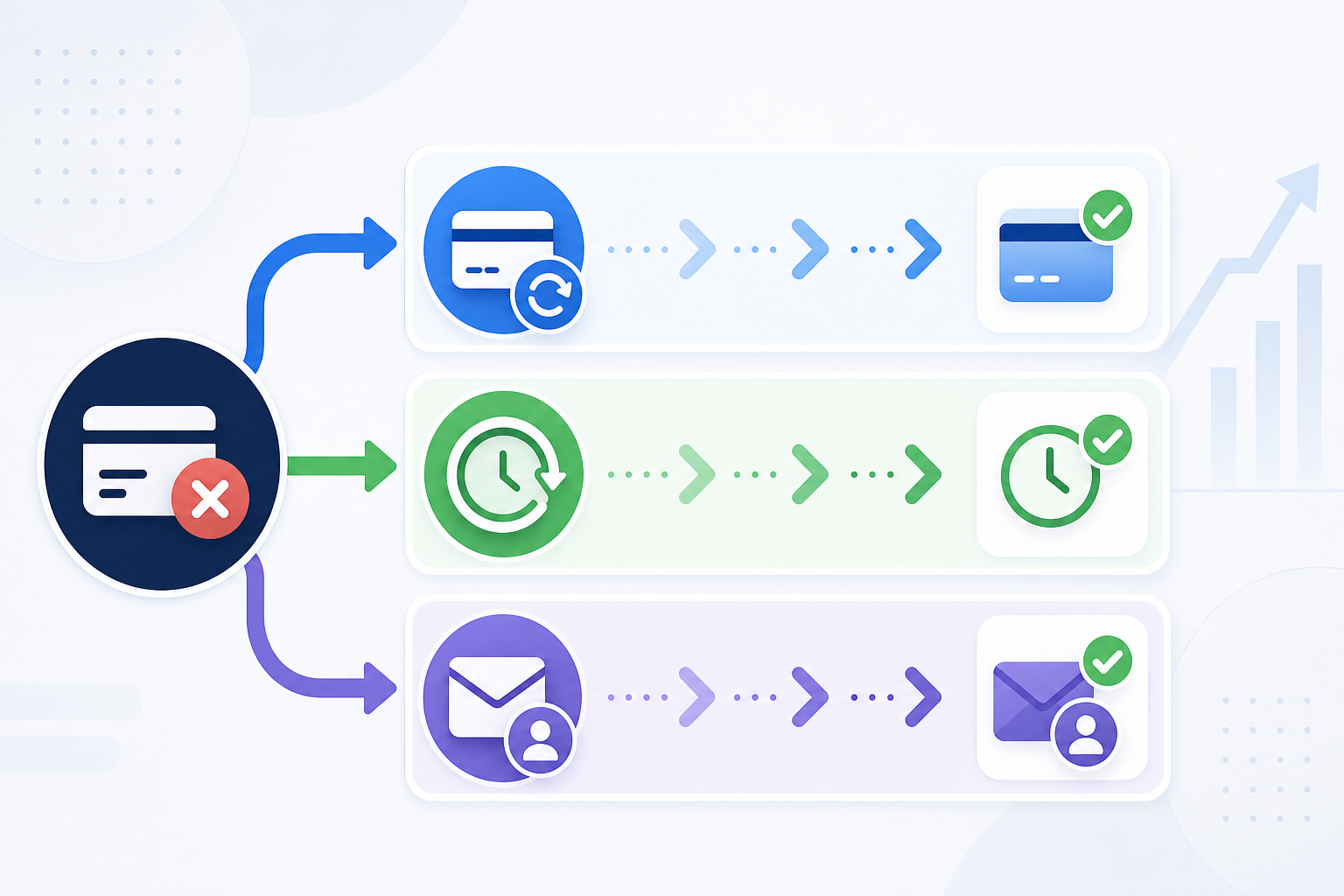
Card account updater (CAU) handles credential staleness, either as a proactive batch sweep before billing runs or as a triggered query when an expired-card decline surfaces. Smart retry logic handles timing and frequency decisions for soft declines that credential freshness cannot fix: insufficient funds, velocity limits, temporary do-not-honor codes. Dunning handles failures that require the cardholder to act, stolen cards, cancelled mandates, opt-outs from updater programs.
The sequencing matters. A credential failure goes to CAU first, then a post-update retry. A soft funding decline skips CAU entirely and goes straight to timed retries. A hard decline or cardholder-action scenario skips both and routes to dunning. A failure reason dunning cadence then routes each decline type to the right lane. Blurring those lanes means you either send dunning emails to subscribers whose cards just needed a silent refresh, or you burn retry attempts on cards that need the subscriber to act directly.
Running all three layers together is where recovery rates climb. Each layer recovers a distinct slice of otherwise-lost revenue that the other two cannot reach.
Retry Compliance Rules That Apply After a Card Update
Receiving a credential update does not reset your retry count with the card networks. Visa and Mastercard payment retry rules cap retries at 15 attempts within 30 days per card and transaction amount for Visa; Mastercard allows 10 retries within 24 hours on soft declines. A card account updater (CAU) refresh changes the credential, not the clock.
MAC 03 (Do Not Try Again) is the hard case: Mastercard charges a per-retry penalty fee when a merchant ignores it, and a credential refresh does not nullify that instruction.
The conservative read: treat prior MACs as still active unless you have a clear reason to believe the rejection was instrument-specific, not account-level.
How Slicker Handles the Retry Decision After a Card Update
When a card account updater (CAU) event fires, whether from a proactive batch sweep or a response to a failed attempt, Slicker's AI models score the refreshed credential across more than 40 variables (validated through AABB testing on each customer's own transaction data): card type, issuing bank behavior, geographic payday cadence, and time-of-day signals. The retry is scheduled for the moment most likely to authorize, not simply the first available slot.
Instead of exhausting the network's retry allowance on a single instrument, Slicker distributes attempts across all payment methods on file. A CAU-refreshed card becomes one option in that pool, not the only one.
Industry data shows smart retries consistently reach 70 to 85% recovery on recoverable failed payments, versus 40 to 60% for fixed retry schedules. How much of that lift is attributable to CAU-aware timing versus other variables is measured through AABB testing in payment recovery on each customer's own transaction data, producing statistically precise results, not benchmarks borrowed from other merchants.
Final Thoughts on Card Account Updater and Payment Recovery
Card account updater solves a real, measurable problem, but only for the slice of declines that are actually credential-related. The rest of your recovery rate depends on how well your retry logic and dunning handle everything else. Build the sequencing correctly and each layer does its job without stepping on the others. If you're working through how to fit CAU into a fuller recovery setup, talk to our team.
FAQs
What does AI-powered retry logic do differently from the built-in retry logic in Stripe or Chargebee?
Built-in retry logic in billing platforms runs on fixed calendar schedules that fire regardless of why a payment failed. AI-powered retry systems analyze over 40 variables per transaction, including decline code, card type, issuing bank behavior, geographic payday cadence, and time-of-day signals, to determine whether to retry, when, and on which payment method. The recovery gap between smart and fixed schedules is substantial; see the section above for figures.
Should a card account updater refresh replace a retry attempt, or do the two work together?
They solve different failure types and should run in sequence, not in place of each other. A credential problem like an expired card goes to the card account updater (CAU) first; once fresh credentials return, retry immediately. A funding problem like insufficient funds skips the CAU entirely and goes straight to timed retry scheduling, because a credential refresh adds no value when the card is valid but the account balance is low. Blurring that distinction burns retry attempts and dunning window time on the wrong tool.
How does Slicker handle the retry decision after a Mastercard real-time network alert fires?
When Mastercard detects that a previously declined card has been successfully used for an equal or larger purchase elsewhere on its network, it sends Slicker a real-time insufficient-funds alert. Slicker's AI models use that confirmed fund-availability signal to schedule an immediate retry instead of waiting for an estimated payday window. Merchants can enroll by providing their payment service provider Merchant IDs (MIDs); this is an active production capability, not a roadmap item, and the incremental lift it generates is measured via AABB testing against each customer's own transaction data.
How do I handle failed subscription payments without triggering Mastercard retry penalties?
Mastercard charges a per-retry penalty fee when a merchant retries after receiving Merchant Advice Code (MAC) 03 ("Do Not Try Again"), and caps retries at 10 within 24 hours on soft declines. The key discipline is classifying the decline code before acting: stop on hard declines and MAC 03 instructions, apply timed retry windows for soft declines like insufficient funds, and route to dunning when cardholder action is the only path to recovery. A credential refresh from a card account updater does not reset your retry count or nullify prior MAC guidance, so prior instructions carry over to the refreshed card unless you have clear evidence the rejection was instrument-specific and not account-level.
What is the difference between batch and real-time card account updater, and which fits a monthly billing cycle?
Batch card account updater submits stored credentials to Visa Account Updater (VAU) or Mastercard Automatic Billing Updater (ABU) on a nightly or weekly schedule and refreshes your vault before the next billing run; real-time queries the network at the moment a charge fires. For most subscription businesses running monthly billing, batch is sufficient because the update cycle completes well before the next charge date. Daily or intraday billing cycles benefit more from real-time coverage, since a weekly batch window can leave a meaningful gap where stale credentials sit in your vault on a card that was reissued earlier that week.
Related Articles
PayPal Subscription Payment Failed: Why It Happens and How to Recover It
A subscriber pays you through PayPal every month without thinking about it. Then their linked bank card expires, or they tidy up their PayPal settings and...
Authentication Required Declines on Subscription Renewals: SCA, MIT Exemptions and Recovery
A renewal that has charged cleanly for a year suddenly comes back declined with authentication_required. The card is valid, the customer has money, and nobody...
Stripe Smart Retries Alternatives for Subscription Businesses (October 2026)
You turned on Stripe Smart Retries because it was free, it was one toggle, and Stripe said it beats a fixed schedule. Months later your past-due list still...
Stop losing revenue to failed payments
Join leading subscription businesses using Slicker to recover failed payments automatically.
Get Started