Failed Payments in Usage-Based and AI Billing: Why They Happen and How to Recover Them
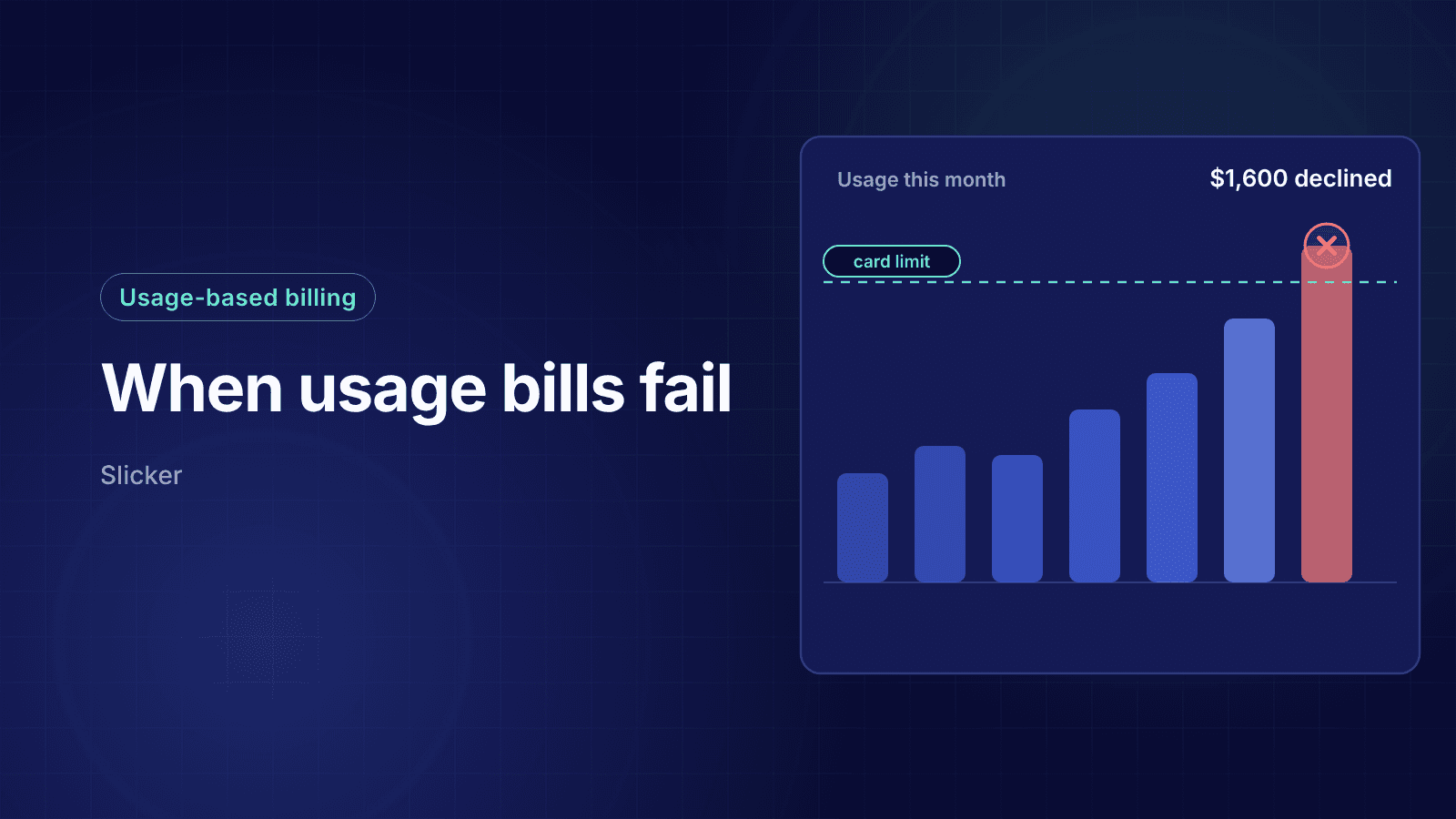
Your best customer had a big month. Their team shipped an agent, usage tripled, and the invoice came out at four times the usual amount. The card that paid $400 without a problem for a year was declined at $1,600, and the customer only found out when your app stopped responding.
That is the new shape of failed payments for AI and usage-based products. The charge amounts move every month, top-ups fire automatically in the middle of a workday, and the compute behind every unpaid invoice has already been spent. Recovery playbooks built for a flat $49 monthly plan miss most of what goes wrong here.
This guide explains why usage-based and AI billing produces failures that fixed subscriptions rarely see, how each billing model fails differently, and how to retry, message and protect access so you recover the revenue without losing the customer.
TLDR:
- Usage-based billing fails differently: variable amounts trip issuer fraud models and card limits, and frequent automatic top-ups trip velocity rules.
- Arrears invoices fail after the compute is spent, while prepaid auto-reload failures cut the customer off mid-task, so each model needs its own playbook.
- Corporate and virtual cards with spending caps are a leading cause of declines on large AI invoices, and they recover best after the limit resets.
- Billing thresholds, usage alerts and pre-authorization prevent many failures before the charge, at the cost of more transactions.
- Slicker reads each decline code and amount pattern, times smart retries around card limit resets and sends hyper-personalized emails that explain the bill.
Why Usage-Based Billing Produces More Failed Payments
A fixed subscription charges the same amount on the same day every month. After a few cycles the issuer's risk model has seen that pattern many times, and the charge looks routine. Usage-based billing breaks that pattern on purpose. The amount depends on what the customer consumed, so it can double one month and halve the next.
Issuers score every authorization against the cardholder's history. A recurring charge that suddenly jumps by 300% looks less like a subscription and more like fraud, and it is far more likely to hit the cardholder's available credit. The same logic applies to frequency. A product that auto-reloads credits five times in a day produces five card charges in a few hours, which can trip velocity rules that a monthly subscription never touches.
The shift is accelerating. GitHub Copilot moved every plan to usage-based billing with AI Credits on June 1, 2026, with each plan's price included as credits and overage billed beyond it. Model providers sell API access through prepaid credits with automatic reload. If your product resells model capacity, your billing now inherits the same variability your customers' agents create.
The Three Usage-Based Billing Models and Where Each Fails
Most AI and usage-based products bill in one of three ways, often combined. Each has a different failure point, a different cost when it fails and a different first fix.
| Billing model | How it charges | Where it fails | Typical declines | First fix |
|---|---|---|---|---|
| Arrears invoice | Usage is metered during the period and invoiced at the end | The large end-of-period invoice | Insufficient funds, do not honor, exceeds limit | Smaller, more frequent invoices via thresholds |
| Threshold invoice | An invoice fires each time accrued usage reaches a set amount | Many mid-cycle charges in a short window | Velocity exceeded, suspected fraud | Raise the threshold or space the charges |
| Prepaid credits with auto-reload | The customer buys credits; a top-up fires when the balance drops below a threshold | The top-up, at the moment the customer is working | Insufficient funds, authentication required | In-product prompt plus a fast smart retry |
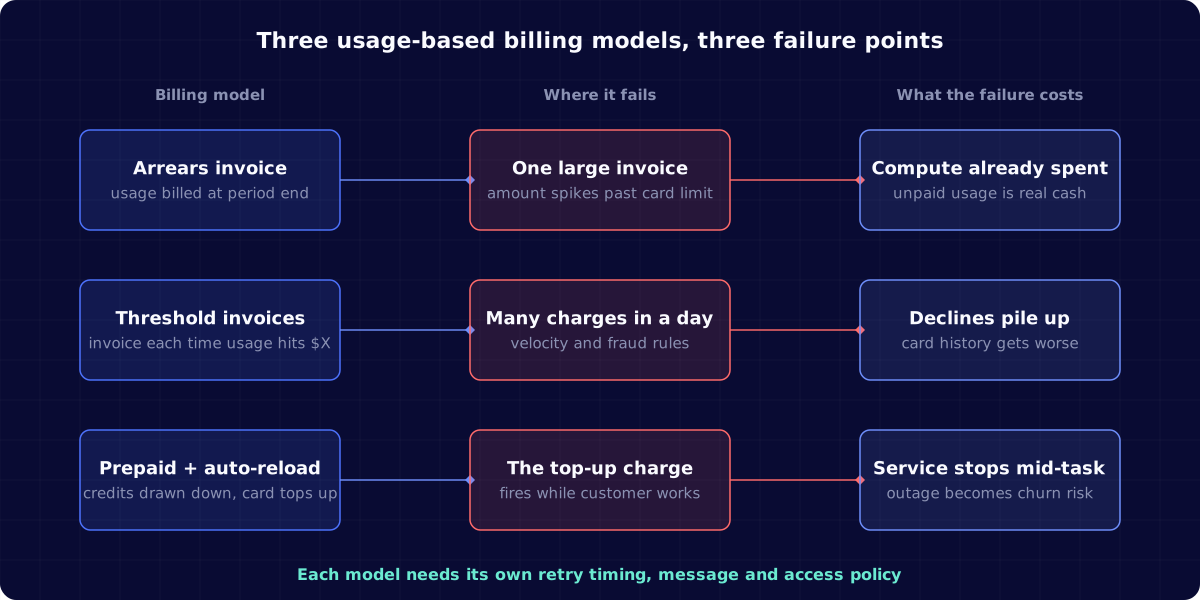
The models trade risk against friction. Arrears billing gives the smoothest experience but carries the most unpaid exposure. Prepaid credits carry the least exposure but turn every failed top-up into a service interruption. Thresholds sit in between and create more transactions to fail.
Arrears Invoices: The Compute Is Already Spent
With pure arrears billing you serve the usage first and charge for it later. Stripe's usage-based billing works this way by default: usage is reported against a meter during the period and rated into an invoice when the period closes. When that invoice fails, you are not recovering future revenue. You are recovering money you have already paid to a model provider or a GPU host.
That changes the economics of every recovery decision:
- The cost of a lost invoice is real cash, not just foregone margin, so recovery deserves more attention per dollar than on a flat plan.
- Retrying for weeks is expensive if access stays open, because the customer can keep consuming while the invoice is unpaid.
- Cutting access on the first failure is also expensive, because your heaviest users are often your most valuable accounts, and one bad card is not the same as a bad customer.
Schematic's analysis of non-payment in AI apps argues that default dunning windows built for SaaS can leave weeks of unpaid usage open and recommends failing fast for prosumer apps. That is right for anonymous self-serve users with no history. For an account that has paid reliably for a year, a short grace period with usage limits, rather than an immediate shutoff, usually recovers more.
Threshold Invoices: Smaller Charges, More of Them
Billing thresholds reduce exposure by invoicing mid-cycle once accrued usage reaches an amount you set. Stripe's billing thresholds can trigger on a monetary amount for the subscription or a usage quantity for an item, and can optionally reset the billing cycle anchor when the threshold is reached.
Thresholds solve the bill shock problem by keeping each charge small and predictable. They create a new one: frequency. A customer whose usage spikes can generate several threshold invoices in a single day, and issuers apply velocity limits to repeated charges from the same merchant.
Three rules keep thresholds from causing the declines they were meant to prevent:
- Size the threshold to the customer, not to your whole base. A threshold that fires once a week for a typical account may fire hourly for your largest one.
- Watch for velocity declines such as
card_velocity_exceededand issuer code 65. When they appear, a higher threshold is often the fix, not another retry. The velocity exceeded decline guide covers how long those limits last. - Know the edge cases. Stripe's usage monitoring documentation notes that thresholds do not apply to trial subscriptions, are not evaluated in the 24 hours before a subscription ends, and allow one monetary threshold per subscription.
Prepaid Credits and Auto-Reload: Failures That Stop the Work
Prepaid credits flip the risk. The customer pays first, usage draws down the balance, and an auto-reload charges the saved card when the balance drops below a threshold. Anthropic's API billing, for example, sells prepaid credits with optional auto-reload, and requests fail when the credits run out.
You never carry unpaid usage, but a failed top-up becomes an outage for the customer. Their agent stops halfway through a job, their product returns errors to their own users, and the person who notices is usually an engineer, not whoever owns the card.
That timing matters more than the decline code. A failed auto-reload needs:
- An in-product message at the moment of failure, shown to the person using the product, with a link to update the card or approve the charge.
- A fast smart retry for soft declines, because the customer is actively trying to work. Waiting three days is fine for a monthly renewal and useless here.
- An email to the billing owner, not only the user who hit the wall, since they are often different people in a business account.
- A clear rule for what keeps working. A small overdraft or reduced rate limit for accounts in good standing avoids turning one decline into a churned customer.
If you use Stripe for credits, billing credits apply only to metered prices reported through Meters and apply to invoices at finalization, so check that your top-up flow and your credit balance logic agree on when credits are actually available.
Corporate Cards, Virtual Cards and Spending Limits
AI tools are often bought by teams, not individuals, and paid with corporate or virtual cards. Those cards come with controls that a personal card does not have: per-transaction caps, monthly spend limits, merchant category locks and single-vendor virtual cards issued for an expected amount.
A virtual card issued for a $500 monthly tool budget will decline a $1,600 usage invoice every time, no matter how often you retry it. The decline often comes back as a generic insufficient funds or do not honor response, so from the outside it looks like the customer cannot pay, when in fact a finance admin simply has not raised the limit.
Recovery here depends on two things:
- Timing retries around limit resets. Corporate card limits usually reset at the start of a statement or calendar period, so a retry on the first business day of the month is far more likely to succeed than one on day 27.
- Reaching the person who controls the card. The developer using your product cannot raise the company card limit. The email has to tell the billing owner exactly what happened: the amount, why it was higher than usual and what limit to change.
Bill Shock: When the Customer Did Not Expect the Charge
Some usage-based declines are not about the card at all. The cardholder sees a charge far larger than usual, assumes fraud and blocks it, or the issuer does it for them. The next attempt may succeed after the cardholder confirms it, or it may turn into a dispute weeks later.
The cheapest fix is to make the charge expected before it happens. Stripe's usage alerts can notify you when a customer crosses a usage threshold, and you can pass that on to the customer as a heads-up before the invoice. A short message such as "your usage this month is on track for about $1,600, here is what drove it" does three jobs: it prevents a surprise decline, it gives a corporate cardholder time to raise a limit, and it reduces the chance that a legitimate charge becomes a chargeback.
Messages that explain the bill also recover more after a failure. A generic "your payment failed" email gives the customer nothing to act on. An email that shows the usage behind the amount, the card that was declined and the fastest way to fix it is what hyper-personalized dunning emails are designed for.
Pre-Authorization: Checking the Card Before You Serve the Usage
For high-cost usage, you can check that a card can cover an amount before you let the customer consume it. Lago's payment pre-authorization is one example: it places an authorization hold for a set amount on a Stripe card before creating the subscription, releases the hold if it succeeds and aborts if it fails.
Pre-authorization is useful at three moments:
- Before a trial converts on a product where a single user can burn real compute in days.
- Before raising a customer's usage limit, such as moving an account to a higher tier or removing a cap.
- Before a large known job, such as a batch run the customer schedules in advance.
It is not a guarantee. A hold confirms the card could cover the amount at that moment, not that the invoice will clear later, and holds count against the cardholder's available credit while they last. Use them where the cost of serving unpaid usage is high, not on every charge.
How to Retry Failed Usage-Based Payments
Retry rules for usage-based billing need two inputs that flat subscriptions mostly ignore: the amount relative to the customer's history, and the billing model the charge came from.
| Decline signal | What it usually means in usage billing | Retry approach |
|---|---|---|
| Insufficient funds on a charge well above the usual amount | Card limit or balance cannot cover the spike | Retry after likely limit resets or paydays; message the billing owner |
| Do not honor or suspected fraud on a large or unusual amount | Issuer risk model flagged the change | One retry after the customer confirms; avoid repeated attempts |
| Velocity exceeded | Too many charges in a short window | Stop retrying until the window clears; raise the threshold |
| Authentication required | Issuer wants the cardholder present, common in Europe | Send an authentication link; retries without the customer fail |
| Hard declines such as stolen card or closed account | The card will never work | Do not retry; ask for a new payment method |
Two principles sit on top of the table. First, retrying a large usage invoice too often costs more than it does on a small plan, because each failed attempt adds to issuer risk scoring and network retry limits, which the guide to retry velocity caps explains. Second, the amount itself is a signal. Insufficient funds on $1,600 is a different problem from insufficient funds on $40, and insufficient funds recovery works best when the retry schedule reflects that.
Protecting Access Without Losing the Customer
Every usage-based business has to decide what happens to access while a payment is failing. Hard shutoffs protect your compute bill and punish your best accounts. Open access protects the relationship and grows your exposure.
A tiered policy usually works better than either extreme:
- New or self-serve accounts with no payment history: fail fast, with one quick retry and a cap on further usage until the card works.
- Established accounts with a clean history: a short grace period with a usage ceiling roughly equal to one normal billing period, plus messaging to the billing owner.
- Contracted or invoiced accounts: treat a failure as an accounts receivable task, not a product block, and route it to a person.
Whatever the policy, it should be decided before the failure, written down and visible in your dashboards. Teams that track failures by billing model, card type and amount band can spot a problem pattern, such as threshold invoices tripping velocity limits for one card network, before it becomes a wave of churn. The failed payment spike checklist is a good starting point for that kind of segmentation.
How Slicker Handles Failed Payments in Usage-Based Billing
Slicker works on top of the billing platform you already use, including usage, tiered and hybrid pricing on Stripe Billing and Zuora. Its smart retries read the decline code, card type and issuer behind every failure and choose whether and when to retry, so a corporate card is retried around its spending limit reset and a consumer debit card around pay cycles, instead of on a fixed schedule.
Slicker's hyper-personalized dunning emails go out from your own domain and only when customer action is the only path to recovery, such as raising a card limit or confirming a large charge. Slicker Analytics compares each segment with its own baseline and flags approval drops by card network, country or decline code, so a pattern like velocity declines on threshold invoices shows up as an alert rather than a month of lost revenue. Every change is measured with AABB testing against your current setup, so you see the recovered dollars before you pay.
Final Thoughts on Failed Payments in Usage-Based and AI Billing
Usage-based pricing is becoming the default for AI products, and it moves failed payments from a predictable monthly event to something that can happen at any hour, at any amount, in the middle of a customer's work. The fixes are not exotic: size thresholds per customer, warn before big charges, retry around card limits rather than on a calendar, reach the person who owns the card and decide your access policy in advance.
What changes is that every one of those decisions now depends on the amount, the billing model and the customer's history together. If your recovery logic still treats a $1,600 usage invoice like a $49 renewal, talk to the Slicker team about recovering usage-based revenue on your existing billing stack.
FAQ
Why do usage-based billing payments fail more often than fixed subscriptions?
The charge amount changes every period, so issuer risk models see larger and less predictable charges than a fixed plan. Big jumps hit card limits and fraud checks, and frequent automatic top-ups or threshold invoices can trip velocity rules. The result is more insufficient funds, do not honor and velocity declines than the same customer would see on a flat price.
What should happen when an AI API customer's auto-reload payment fails?
Show the person using the product an in-product message right away, retry soft declines quickly because the customer is actively working, and email the billing owner with the amount and a link to fix the card. For accounts in good standing, a small usage allowance while the payment is fixed prevents one decline from becoming a churned customer.
Should I use billing thresholds or prepaid credits for usage-based pricing?
Prepaid credits remove unpaid usage but turn every failed top-up into a service interruption. Billing thresholds keep each invoice small but create more charges that can trip velocity limits. Many AI products combine them: credits or thresholds for self-serve accounts with little history, and arrears invoicing with sensible limits for established customers.
How do I recover a large usage invoice declined on a corporate card?
Assume a spending limit first. Email the billing owner with the amount, what drove it and the limit that needs to change, and schedule the retry after the card's limit is likely to reset, usually the start of a month or statement period. Repeated retries before the limit changes only add declines to the card's history.
Can Slicker recover failed payments for usage-based pricing on Stripe Billing?
Yes. Slicker connects to Stripe Billing and Zuora, including usage, tiered and hybrid pricing, and applies decline-code-aware smart retries and hyper-personalized emails to failed usage invoices. Results are measured with AABB testing against your current setup, so you only pay for revenue Slicker recovers above your baseline.
Related Articles
Why Are My Payments Failing Suddenly? A Diagnosis Checklist for Failed Payment Spikes
Your failed payment count doubled overnight. Finance is asking whether revenue is at risk, support is seeing "my card was declined" tickets, and the payments...
Apple Pay and Google Pay Recurring Payment Failures: Causes, Tokens and Recovery
Wallet checkouts convert beautifully. A customer taps Apple Pay or Google Pay, confirms with a face scan, and your subscription starts in seconds. Then a few...
PayPal Subscription Payment Failed: Why It Happens and How to Recover It
A subscriber pays you through PayPal every month without thinking about it. Then their linked bank card expires, or they tidy up their PayPal settings and...
Stop losing revenue to failed payments
Join leading subscription businesses using Slicker to recover failed payments automatically.
Get Started