Failure Reason Dunning Cadence: Route Every Decline Right (August 2026)
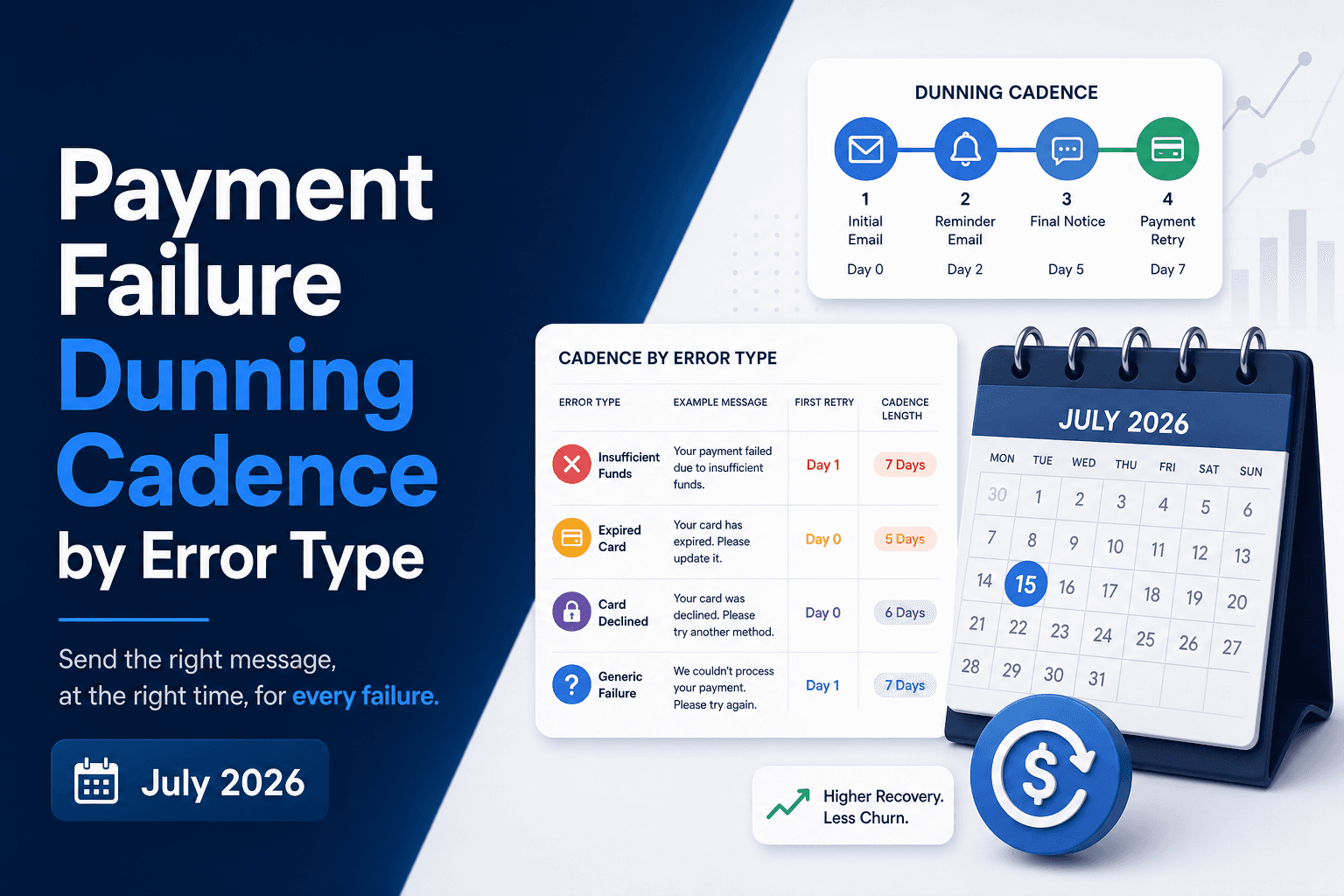
A payment failure is a signal, and the signal means something different depending on the decline code behind it. Treating them all the same way, one email sequence for every error type, leaves recoverable revenue sitting on the table and sometimes pushes subscribers toward canceling. Breaking down the right sequence by failure reason is what actually moves recovery rates.
TLDR:
- Soft declines need silent retries first; hard declines require immediate customer email. One sequence for both burns trust and MRR.
- For insufficient funds, front-load retries around payday windows (days 1-3) and only email after day 10 if retries stall.
- MAC codes carry timing signals: MAC 03 stops retries entirely, MAC 02 allows retries spaced 3-5 days apart, MAC 21 routes to a win-back flow.
- Track recovery rate within 30 days segmented by decline code; gaps between error types tell you exactly where your cadence breaks down.
- Slicker reads the exact failure reason on every declined transaction and routes each one to a distinct retry or dunning sequence automatically.
Why Error Type Is the Foundation of Dunning Cadence Design
Not every failed payment signals the same problem, and a dunning cadence that ignores this distinction leaves recoverable revenue on the table.
A stolen card will never resolve through retries. A soft decline from a temporarily frozen account very likely will. Sending the same email sequence to both subscribers wastes sends, erodes trust, and triggers cancellations that better routing would have prevented.
The failure reason is the starting point for every sequence decision: who receives an email at all, what that email says, and how urgently recovery needs to happen. Get that foundation wrong, and even a well-timed cadence works against you.
Soft Declines vs. Hard Declines: Routing Every Failure to the Right Path
Not every payment failure points to the same problem, and your dunning cadence by error type should reflect that. The two broadest categories, soft declines and hard declines, require fundamentally different routing logic before a single email is ever sent.
Soft declines are temporary. Insufficient funds, processor timeouts, and velocity flags can often be resolved without any customer contact at all. A well-timed retry on the right day may recover the payment silently, leaving the subscriber unaware anything happened. Customer communication only enters the picture when retries have been exhausted.
Hard declines are permanent. A stolen card, a closed account, or an expired card will not resolve on its own. No retry will fix a stolen card; only the customer can act. Sending the same "we couldn't process your payment" email to both failure types wastes goodwill and accelerates cancellation.
Getting this routing right is the foundation of any payment failure sequence that recovers revenue without burning subscriber trust.
The Insufficient Funds Sequence: Retry First, Email in the Gaps
For insufficient funds failures, the sequence logic is straightforward: retry aggressively early, then pull in email only when retries stop working. Checkout.com's payment retry guide notes that well-timed retry logic has rescued roughly 20% of payments entered into dunning, translating directly to revenue recovered without customer contact.
Industry data shows insufficient funds is the most common soft decline reason, affecting a large share of recurring billing attempts each month. Most of these accounts recover on their own within days as paychecks clear or transfers post.
Retry Windows Come First
Your soft decline retry cadence should front-load attempts around known pay cycles:
- Days 1 to 3: retry once or twice, targeting the 48-hour window when most direct deposits land for US subscribers; for UK and Western European subscribers, target the 1st and 15th of the month when salary payments typically clear
- Days 4 to 7: hold back and let account balances stabilize before attempting again
- Day 8 to 10: one final automated retry before escalating to email
Email Enters Only After Retries Stall
If the account still hasn't cleared by day 10, a single, value-focused email performs better than a flurry. Frame it around what the subscriber loses, not around the failed charge itself. Keep the call to action simple: update a backup payment method or confirm their billing details.
This sequencing recovers the majority of insufficient funds cases without a single customer touchpoint, protecting the subscriber relationship while keeping your involuntary churn rate low.
The Expired and Reissued Card Sequence: Account Updater First, Then Email
When a card is reissued or expired, the failure code tells you something specific: the card number has changed, and no retry will work until credentials are refreshed. Automated recovery has nothing to retrieve. This is where the dunning sequence takes over.
The right failure-reason email sequence here starts with Account Updater checks before sending anything to the customer. Account Updater services, offered by Visa and Mastercard, automatically refresh stored card credentials when a bank reissues a card. If Account Updater resolves the credential silently, no email is needed at all.
Only when Account Updater cannot resolve the card should your payment failure sequence escalate to customer contact.
When Email Becomes Necessary
If Account Updater returns no match, your sequence should:
- Send a first email within 24 hours of the failure, framing the message around service continuity, not the missed payment itself. The subscriber stands to lose access to something they actively use.
- Follow up at day three if no action has been taken, with a direct link to the payment update flow. Friction here costs you the recovery.
- Send a final notice at day seven, reinforcing what lapses without action.
Treating every expired or reissued card failure as a generic "update your payment method" email ignores the Account Updater step entirely, which means contacting customers you never needed to contact, and damaging trust in the process.
The Stolen Card and Fraud-Flag Sequence: Stop Retrying Immediately
When a payment fails due to a stolen card or active fraud flag, retrying the charge is the wrong move. Unlike soft declines where timing and issuer conditions drive recovery, hard declines tied to fraud signals carry a clear message: the card cannot and should not be used again. Retrying wastes processing attempts and risks triggering additional fraud alerts on the merchant account.
The right failure-reason email sequence here skips retry logic entirely and routes directly to customer communication. That sequence should:
- Notify the customer promptly that their payment method needs replacing, without exposing sensitive fraud details that could alarm or confuse them. Send this from your own brand domain, framing the message around your service and the subscriber's account, not around the fraud event.
- Frame the message around service continuity, not the declined charge itself.
- Provide a direct, frictionless path to update their payment method.
- Send a single follow-up if no action is taken, then pause and avoid flooding the inbox.
Aggressive multi-touch sequences built for soft declines become counterproductive here. A subscriber whose card was compromised is already dealing with disruption; an email cadence that mirrors a delinquency collection sequence adds friction without improving recovery odds. Knowing when to stop retries earlier is as important as knowing when to retry.
The payment failure sequence for fraud-flagged errors should close with one outcome: a new card on file. Once that update is confirmed, the relationship continues on solid footing with no revenue lost to unnecessary retry noise.
The Generic and Ambiguous Error Sequence: Classify Before You Act
Not every payment failure carries an obvious signal. Many decline codes return vague responses like "do not honor" or "generic decline," leaving your system without a clear path forward. Treat do-not-honor as a soft decline and attempt one retry before escalating to email.
Before routing a failed payment into any recovery sequence, you need to classify the error. The three questions worth asking:
- Does this error require customer action, or can it be resolved silently through a retry? Stolen or expired cards need the customer to act; insufficient funds often just need better timing.
- Is this a temporary network issue or a card-level problem? Temporary issues resolve on their own; card-level problems won't.
- Does the issuer's response suggest the account is still viable? Some declines signal the relationship is effectively over before any dunning begins.
Skipping this classification step and sending a generic "update your payment method" email wastes sends, accelerates unsubscribes, and burns deliverability on subscribers who could have been recovered quietly. The failure-reason email sequence only works when the failure reason actually drives the routing logic.
How Merchant Advice Codes Shape the Timing of Each Retry Step
Industry data shows that Merchant Advice Codes (MACs) carry timing signals beyond simple yes/no verdicts. A MAC 03 (do not try again) requires you to pause the sequence entirely until the cardholder updates their credentials. A MAC 21 (stop recurring payment) should close the retry window and route immediately to a cancellation or win-back flow. Meanwhile, MAC 02 (try again later) gives you an explicit green light to retry, but the "later" still requires judgment: retry too soon and the issuer flags it as aggressive; wait too long and the subscriber cancels on their own. For a full reference of Mastercard Merchant Advice Codes and their meanings, Chargebacks911 maintains a complete reference list.
A well-structured dunning cadence by error maps each MAC to a distinct sequence with its own timing rules.
MAC-to-Sequence Mapping
MAC Code | Meaning | Retry Action | Cadence Implication |
|---|---|---|---|
MAC 01 | New account information available | Update via network, then retry | Retry within 24 hrs after account update |
MAC 02 | Try again later | Retry allowed | Space retries 3 to 5 days apart |
MAC 03 | Do not try again | No retry | Hold; prompt cardholder action |
MAC 21 | Stop recurring payment | No retry | Route to win-back or cancel flow |
MAC 22 | Merchant does not qualify for product code | No retry | Escalate to customer communication |
MAC 24 | Retry after 1 hour | Retry allowed with delay | Enforce minimum 1-hour window |
Ignoring these codes and running a uniform retry schedule wastes retry attempts where issuers have explicitly signaled to stop, and misses narrow windows where a well-timed retry would succeed.
Measuring Dunning Cadence Effectiveness by Failure Reason
Each failure reason produces a different recovery signal, and your dunning cadence should reflect that. The most reliable way to measure whether your sequences are correctly matched to each error type is to track recovery rate by decline code category over time.
Watch these three metrics per failure reason:
- Recovery rate within 30 days, segmented by error type (insufficient funds, expired card, stolen card, etc.), so you can see whether your cadence is actually moving the needle for each category.
- Time-to-recovery by segment, because a cadence tuned for soft declines should resolve faster than one handling card-not-present fraud flags.
- Dunning letter unsubscribe and complaint rates per sequence, since overly aggressive outreach on a hard decline wastes goodwill on a subscriber who cannot act on your message.
If your recovery rate for insufficient funds errors is strong but your expired card recovery lags, that gap tells you exactly where to adjust sequencing. The data speaks by error type, so your reporting should too.
How Slicker Applies Failure-Reason Sequencing for High-Volume Subscription Businesses
Slicker reads the exact failure reason attached to every declined transaction before building a recovery sequence. A do-not-retry hard decline triggers no retry attempt and routes directly to a targeted dunning email asking the subscriber to add a new card. A soft decline coded as insufficient funds queues a smart retry timed to the subscriber's next likely payday, with no email sent unless retries exhaust. An expired card skips retries entirely and sends a single card-update prompt.
That specificity is what separates smart dunning from a generic dunning cadence. Every path is matched to what the error actually signals about the subscriber's account and the right next action to recover the payment.
Final Thoughts on Routing Every Payment Failure to the Right Recovery Path
The biggest gap in most dunning programs is treating a stolen card the same as a temporarily frozen account, two different problems that need two completely different responses. Getting the routing right means retries fire where they can actually succeed, emails go out only when customer action is genuinely needed, and Merchant Advice Codes set the timing instead of a fixed schedule. That specificity is what keeps your subscriber relationships intact while your recovery rate climbs. Segment your recovery data by decline code category and the weak spots in your current sequences will become obvious fast. Talk to the Slicker team about how failure-reason sequencing works across a high-volume subscription book.
FAQs
Should I send the same dunning email sequence for insufficient funds failures and stolen card failures?
No. Insufficient funds is a soft decline where a well-timed retry often recovers the payment without any customer contact at all. A stolen card is a hard decline that requires immediate customer outreach and a frictionless path to add a new card. Merging these two paths into one generic sequence wastes sends on recoverable accounts and accelerates cancellations on accounts that needed direct action.
How do Merchant Advice Codes change my retry timing for different failure reasons?
Each MAC carries a specific instruction that should shape your retry window. MAC 02 permits retries but works best when spaced 3 to 5 days apart; MAC 03 requires holding all retries until the cardholder acts; MAC 24 enforces a minimum 1-hour wait before the next attempt. Following a uniform retry calendar across these codes burns attempts where the issuer has signaled to stop, and misses the narrow windows where a well-timed retry converts to recovered MRR (monthly recurring revenue).
What is the correct first step when a card fails due to expiry or reissuance before sending a dunning email?
Run an Account Updater check first. Visa and Mastercard Account Updater services automatically refresh stored card credentials when a bank reissues a card, which means a portion of these failures resolve without any customer contact. Only when Account Updater returns no match should your failure-reason email sequence escalate, starting with a service-continuity message within 24 hours of the failure.
Can I build a dunning cadence by error type without engineering resources?
Yes. Slicker maps every failed payment to its specific failure reason and routes it into the correct sequence automatically, with no code changes required to your billing infrastructure. Setup takes under five minutes, and all recovered payments flow through your existing rails as if nothing happened.
How do I measure whether my payment failure sequence is correctly matched to each error type?
Track three metrics per decline code category over a 30-day window: recovery rate segmented by failure reason, time-to-recovery by segment, and unsubscribe or complaint rates per sequence. If your insufficient funds recovery rate is strong but expired card recovery lags, that gap tells you exactly where your sequencing needs adjustment. Your own historical baseline is the most reliable benchmark since recovery rates vary by subscriber mix and billing infrastructure.
Related Articles
What Card Is This? How to Identify and Validate a Card From Its Number
A customer emails support with a card number that "keeps getting rejected." Your checkout says the card is invalid, the customer insists it works everywhere...
Failed Payments in Usage-Based and AI Billing: Why They Happen and How to Recover Them
Your best customer had a big month. Their team shipped an agent, usage tripled, and the invoice came out at four times the usual amount. The card that paid...
Why Are My Payments Failing Suddenly? A Diagnosis Checklist for Failed Payment Spikes
Your failed payment count doubled overnight. Finance is asking whether revenue is at risk, support is seeing "my card was declined" tickets, and the payments...
Stop losing revenue to failed payments
Join leading subscription businesses using Slicker to recover failed payments automatically.
Get Started